How to connect to a Railway database using DBeaver
I love Railway, I always use it for my websites, which almost always include databases, mainly Postgres.
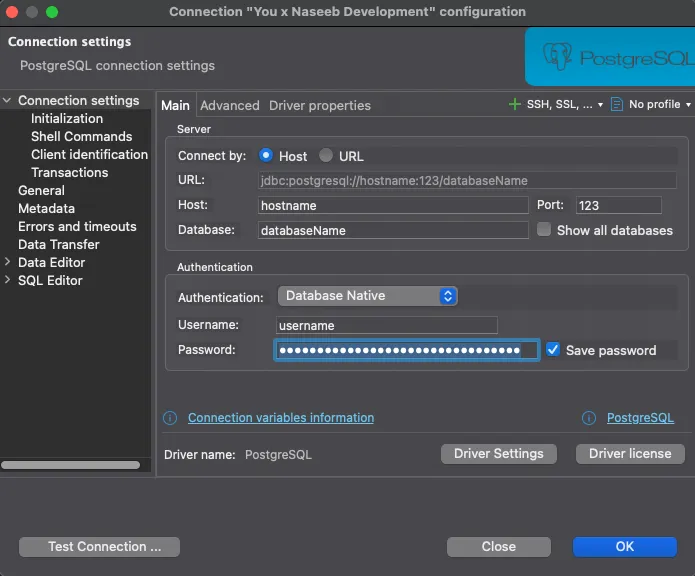
When connecting your Railway database to DBeaver, idk how you do it for other databases, but for Postgres, you have to supply the hostname, the database name, and the port separately, railway databases work through their proxy which means your connection strings won’t work (please lemme know if there’s a way to use connection strings here).
So, you go to your railway-deployed PG instance, open its variables, and get the public connection string from there, DO NOT USE the individually mentioned hostname, database name, and port, those are internal, you do not get to connect to the database directly, hence the proxy connection string.
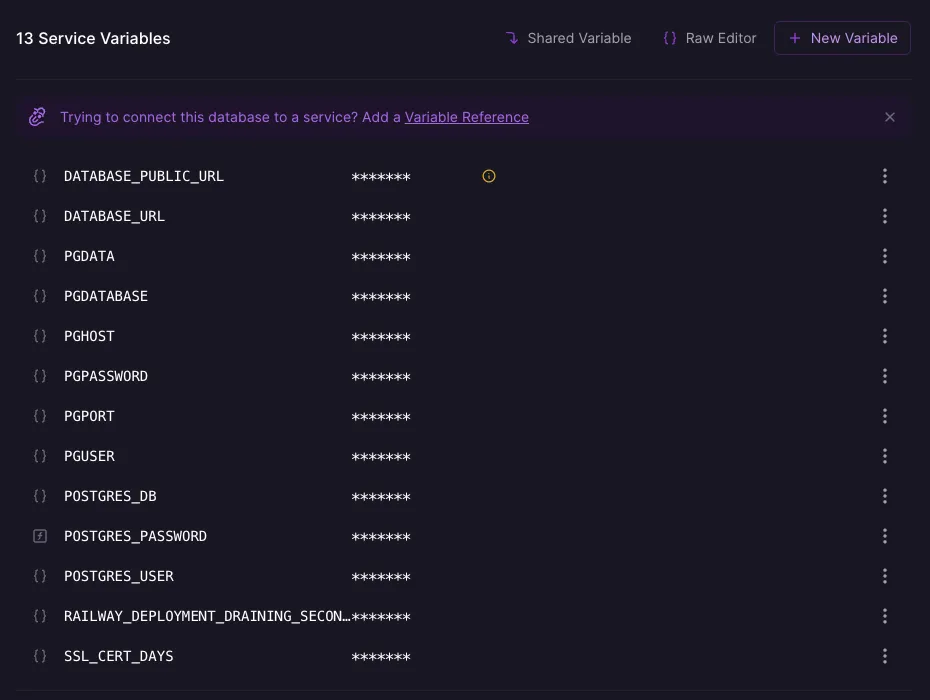
Paste the connection string in your DBeaver input field, then extract the following out of it and paste them in the 3 fields manually. This is what a connection string will look like:
postgresql://username:password@hostname:port/databaseNameYou should be able to extract the info you need pretty easily, fill up the DBeaver form, then copy the PG_USER and PG_PASSWORD from the variables and paste them in the credentials section, and you should be good to go.
That being said, I have a question, why is username always written as username, without any space or any casing differences, but other names such as personName, databaseName, yourmomName, always feel like separate words and have to be written with some sorta difference between the words?
Well, that’s all I had to say. Adios 👋